How to Turn a Photo Into the KDA Firestarter Dance With AI
What’s new on this page
- — Published after 4 runs on the same Firestarter clip: 3 on Wan 3.0 Prime, 1 on Seedance 2.5.
K/DA's FIRESTARTER came out on October 19, 2026, and Kai'Sa's part of the dance is all over TikTok, a lot of it made with AI.
We ran the same 14-second clip four times and kept every result, including the ones that didn't work. Then we packaged the setup that worked into the KDA Firestarter Dance AI generator: upload one photo and generate it right there, no prompt or settings needed.
What is the KDA Firestarter dance?
FIRESTARTER is K/DA's 2026 comeback single, with MIYEON and SOYEON of i-dle, Sophie Powers and Mimi Webb, and a music video animated by Fortiche. Kai'Sa's section of the choreography is the one creators cover and remix most. Our source clip is a 14-second widescreen dance clip (1344×576) in the MV's purple, starry look.
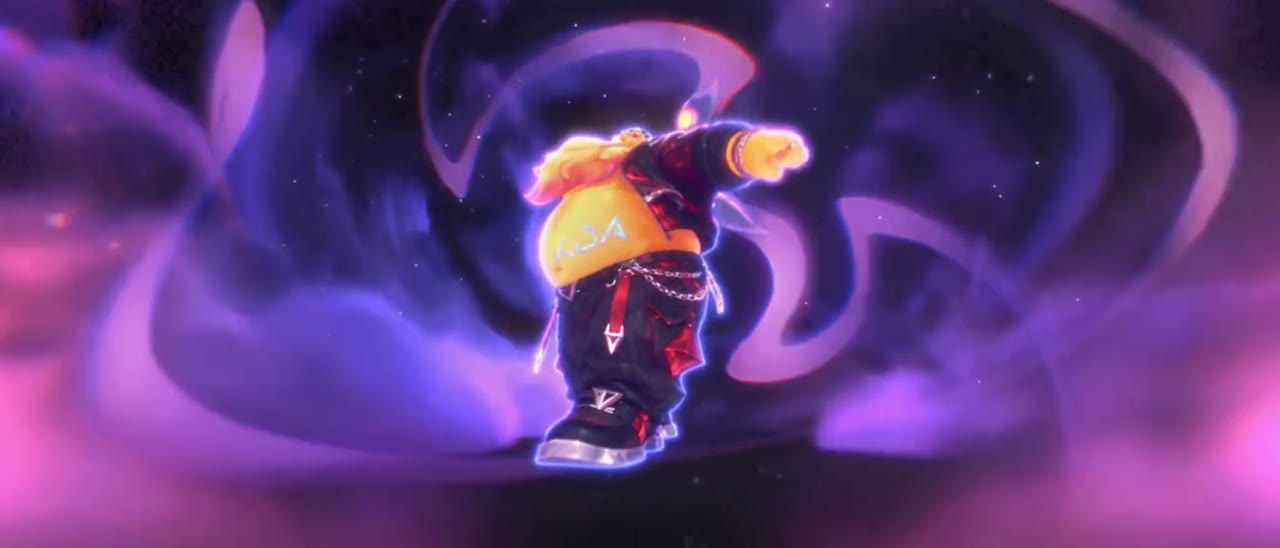
Our 4 tests at a glance
| # | Model | Goal | Photo | Output size | Credits | Time | Result |
|---|---|---|---|---|---|---|---|
| 1 | Wan 3.0 Prime | Put a character into the original scene | Muscular character in a maid outfit, 600×900 | 976×418 (follows the video) | 430 | 2.3 min | Worked |
| 2 | Wan 3.0 Prime | Make the photo do the dance, keep the photo's background | Woman in a red dress in an alley, 1254×1254 | 640×640 (follows the photo) | 430 | 3.9 min | Failed |
| 3 | Wan 3.0 Prime | Same as 2 | Woman in a white tee, white studio, 1086×1448 | 554×740 (follows the photo) | 430 | 2.9 min | Failed |
| 4 | Seedance 2.5 | Same as 2 | Same photo as test 3 | 992×432 (follows the video) | 600 | 5.3 min | Worked |
All four used the same settings: video mode, duration Match source (14s), aspect ratio Source, 480P, audio on, one reference image.
Test 1: swap a character into the scene (Wan 3.0 Prime, worked)
This is the classic video-to-video swap: keep everything from the clip and replace who is in it. Wan 3.0 Prime handled it in about 2 minutes. The output came out widescreen, the same shape as the source clip.
Replace the main character in the source video with the subject from image 1. Keep the exact same movements, poses, timing and camera motion as the original video. Preserve the appearance, features, outfit and colors of the subject from image 1. Keep the original background, lighting and effects unchanged. Blend the new subject naturally into the scene with consistent lighting and shading, smooth motion, no flickering or distortion.
Tests 2 and 3: make the photo dance (Wan 3.0 Prime, failed twice)
Then we flipped it. We wanted the person in the photo to dance in their own background, copying only the moves and camera from the clip. Same model, new prompt.
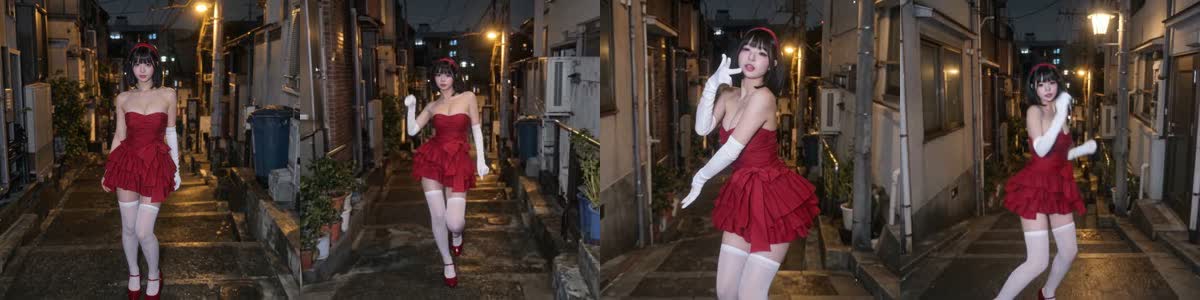
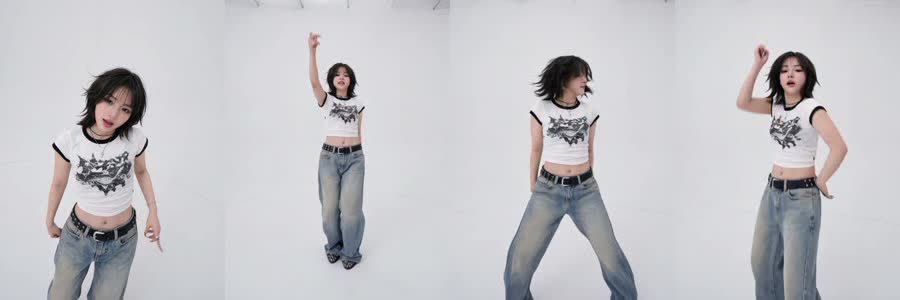
Both runs finished and looked clean, but the dance didn't match the source clip. And the frame shape changed every time: a square photo gave a 640×640 video, a 3:4 photo gave 554×740. With a reference image attached, Wan's "Source" aspect ratio follows the image, not the video.
Test 4: same photo, Seedance 2.5 (worked)
We kept the photo and prompt from test 3 and only switched the model to Seedance 2.5. This time the moves and camera followed the clip, the white studio and outfit stayed from the photo, and the output was 992×432, widescreen like the source. It cost more (600 credits vs 430) and took longer (5.3 minutes), but it's the only run of the three that did what we asked.
Animate the subject from image 1 to perform the exact same movements, poses, timing and camera motion as the main character in the source video. Use the scene from image 1 as the background, keep its environment, lighting and atmosphere. Preserve the subject's original appearance, style, features, outfit and colors from image 1, do not change its art style. Do not copy the background or visual effects from the source video, only its motion and camera movement. Adapt the movements naturally to the subject's body proportions. Smooth natural motion, stable details, no flickering or distortion.
The lesson: which model for which job
| What you want | Wan 3.0 Prime | Seedance 2.5 |
|---|---|---|
| Put your character into the original scene | Works, cheaper (430 credits for 14s) | Not tested |
| Make your photo copy the dance, keep your background | Failed in 2 of 2 tries | Worked first try (600 credits for 14s) |
| "Source" aspect ratio with a reference image | Follows the image | Follows the video |
- Aspect ratio: if you use Wan with a reference image and want the clip's shape, pick a fixed ratio like 16:9 instead of Source, or crop your photo to that shape first.
- Motion transfer: for "my photo does this dance", go straight to Seedance 2.5. It costs more per run but saved us from a third retry.
- Swaps: for "replace the dancer with my character", Wan 3.0 Prime is fast and good enough.
How to make it yourself
- Open the video tool and choose Video.
- Upload the dance clip (2–15 seconds) as the source and your photo as image 1.
- Pick Seedance 2.5, duration Match source, aspect ratio Source, 480P, audio on.
- Paste the second prompt above and press Generate. The cost shows on the button first, and failed renders are refunded.
Photo tips
- Works: one person or character, full body, face visible, room around the arms.
- Works: a wide shot. Your background becomes the stage, and big camera moves need space to fill.
- Risky: close-ups and half-body shots. The legs and footwork get guessed.
- Risky: group photos. The model may blend people.
FAQ
How do you make the KDA Firestarter dance with AI?
With video-to-video AI: the dance clip, one photo and a prompt that copies the moves onto your photo. In our tests only Seedance 2.5 did this reliably. Or use our KDA Firestarter Dance AI template.
What is the KDA Firestarter dance?
The choreography from K/DA's October 2026 single FIRESTARTER. Kai'Sa's part is the section most creators cover on TikTok.
Why did my AI video come out square or vertical?
On Wan 3.0, the Source aspect ratio follows your reference image when one is attached. A square photo gives a square video. Pick 16:9 by hand, or use Seedance 2.5, which followed the video in our test.
Is Wan 3.0 or Seedance 2.5 better for AI dance videos?
Depends on the job. Wan 3.0 Prime swapped a character into the original scene fine. For making your own photo do the dance, Seedance 2.5 worked and Wan failed twice.
How much does it cost?
For a 14-second clip at 480P: 430 credits on Wan 3.0 Prime, 600 on Seedance 2.5. Failed renders are refunded and downloads have no watermark.
Is this official K/DA content?
No. It's a fan-made test, not affiliated with or endorsed by Riot Games, League of Legends, K/DA, Fortiche or the featured artists.