Gangnam Style AI Tutorial: Make the Three-Person Trend Video From 3 Photos
What’s new on this page
- — Published: tested three-person setup on Wan 3.0 Prime and the template built from it.
The Gangnam Style AI trend took over TikTok in mid-October 2026. The clip is a handheld selfie video on a Seoul street at night, Korean flags overhead and PSY's Gangnam Style playing, with three people taking turns hyping each other up in front of the camera. The AI versions put anyone into those three spots: friends, couples, costumed characters.
Most Gangnam Style AI tools you'll find take one photo and give you a solo dance. The version going viral has three people, so this tutorial covers the three-person setup: what to upload, the exact prompt we used, how it came out, and the template we built from it.
Method 1: Make it yourself with video-to-video AI
Step 1: Save a trend clip with three people
Save a 15-second Gangnam Style trend clip as an MP4. Pick one where all three people are clearly separated left to right for most of the clip; that's what lets the model keep track of who is who. Examples of the format: @yapayzekaserisi, @emiliyyam and @lee.hanavibe. Remove any watermark first so it doesn't carry over, and credit the creator when you post.
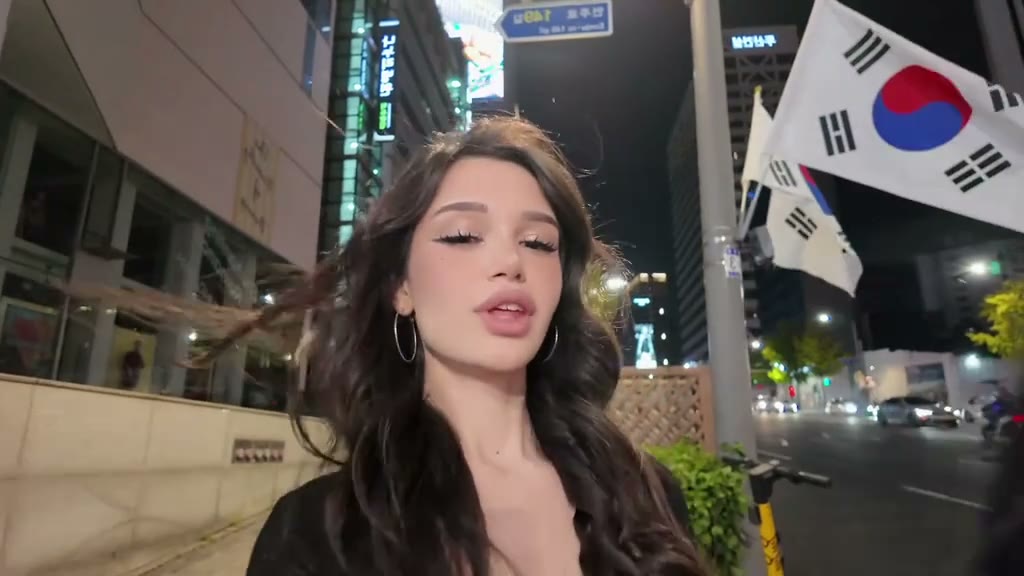
Step 2: Pick three photos, one person each
- One person per photo. Group shots make the model guess which face goes where.
- Face clearly visible, looking roughly at the camera. The clip is mostly selfie close-ups, so the face matters more than the body.
- Waist up or full body if you want the outfit to carry over. We used three costumed characters and the robes, ties and scarves all came through.
- Order matters: photo 1 becomes the person on the left, photo 2 the middle, photo 3 the right.
Step 3: Set up the Video tab
- Engine: Wan 3.0 Prime.
- Source clip: the 15-second trend clip.
- Reference images: your three photos, in left, middle, right order.
- Ratio: auto (match source), length 15s, resolution 480P, Audio on to keep the song.
Step 4: Map each person by position
With three people in the clip, the prompt has to say which photo goes to which spot. Position (left, middle, right) worked better than describing what each person wears, because the clip's people move in and out of frame and the model can still tell where they stand:
Replace the three people in the video with the characters from the reference images, matched by position: - Left person → the character from image 1 - Middle person → the character from image 2 - Right person → the character from image 3 Keep each character's face, hair, and outfit exactly as in their reference image. Keep the original video's motion, expressions, camera movement, timing, background, and lighting unchanged.
Press Generate. The result appears in My Videos; failed renders refund their credits automatically.
Our test run: what came out
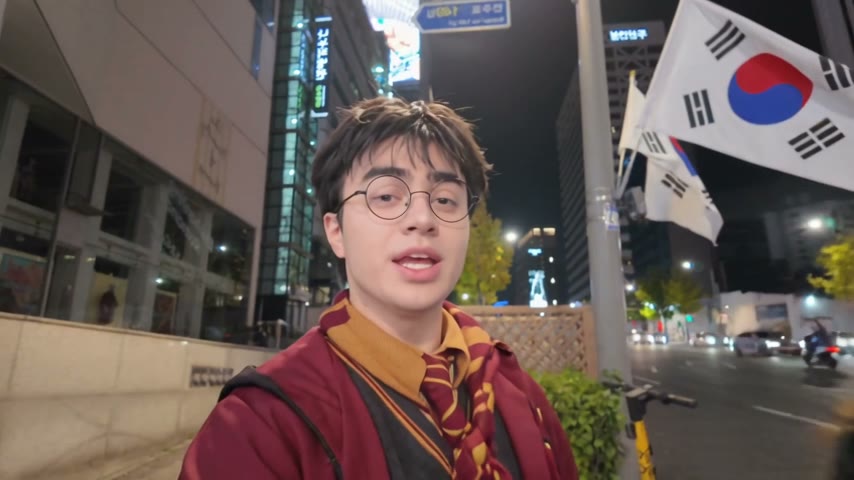
All three people matched their photos, including glasses, hair color and the costume details, and each stayed in the right spot through the camera swings. The street, flags, lighting and song came from the clip. Fast handheld moments got a bit of motion blur, the same as in the original clip.
| Setting | Our run |
|---|---|
| Model | Wan 3.0 Prime |
| Inputs | 1 trend clip (15s) + 3 photos |
| Output | 15s · 480p · with sound |
| Faces matched | 3 of 3 |
| Credits | 460 |
| Time | ~2 min |
Method 2: Use the ready-made Gangnam Style template (3 photos)
We packaged this run as a template: the scene, Wan 3.0 Prime, the prompt above and the settings (15s · 480p · with sound). You only add the three photos.
- Open the Gangnam Style AI video template. It's already loaded.
- Upload three photos into the Left, Middle and Right slots, one person each.
- Press Generate. The video shows up in My Videos when it's ready, so you can close the tab.
- Download the MP4 (no watermark) and post it.
FAQ
What is the Gangnam Style AI trend?
A selfie-style clip of three people on a Seoul street at night with PSY's Gangnam Style playing, remade with AI so the three people are whoever you choose: friends, couples or characters. It started spreading on TikTok in October 2026.
Who sings Gangnam Style?
PSY, the South Korean singer. The song came out in 2012 and its video was the first on YouTube to reach one billion views.
Can I make it with one or two people?
The clip has three people, so the template needs three photos. You can use the same photo twice, or put yourself in all three spots for a clone version.
Why did the AI put the wrong face in the wrong spot?
Usually the photo order. Image 1 is the left person, image 2 the middle, image 3 the right. Also check each photo has only one person in it.
How do I create me dancing with AI?
Use a video-to-video model with a dance clip and your photo, or a one-click template. For this trend, the Gangnam Style template is the shortest path; for other dances see our AI dance video generator.
Is this affiliated with PSY?
No. AI Photo Animator is an independent tool. Only upload photos of yourself or of people who gave you permission.