AI Toy Car to Real Car Transformation: The Prompt That Stopped My Car Driving Backwards
What’s new on this page
- — Published: two Wan 3.0 test runs, the orientation fix and the template built from them.
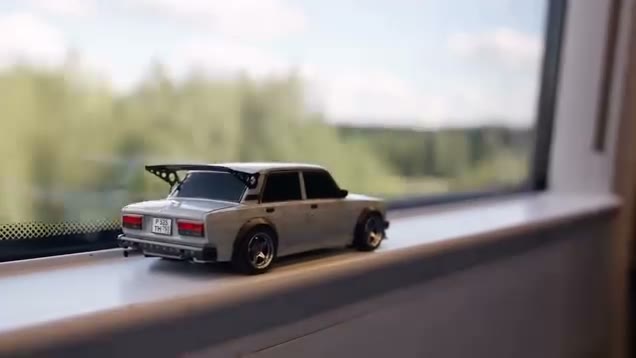
The AI toy car to real car transformation is a transition edit: a small model car sits on a window ledge, the shot moves into a tunnel, and the full-size car drives on through the night. We wanted a version where you swap in any car from one photo, so we took a 15-second toy-car clip and ran it through video-to-video AI.
It took two tries on Wan 3.0. The first run looked great frame by frame and was still wrong: the car drove backwards the whole way. This is what happened, why, and the prompt that fixed it.
Our setup
Both runs used the same inputs, so the only thing that changed between them was the prompt.
- Source clip: 15 seconds. A white Lada model on a windowsill, a tunnel, then the real car on a highway at night, filmed mostly from behind and to the side.
- Reference image: a studio photo of a black movie-style car, shot from the front corner with the nose pointing left.
- Engine: Wan 3.0 in the Video tab, Match source ratio, 480P, Audio on.
- Cost: 300 credits per run, about 5 minutes each.
Run 1: the car drove backwards
Our first prompt was written to work with any subject. It asked the model to keep the reference's exact appearance and to match the original car's position, size, direction and speed in every frame:
Replace the car in the source video with the main subject from the reference image. Keep the subject's exact appearance: shape, proportions, color, materials and all distinctive details. Keep everything else from the source video unchanged: the camera movement, framing, timing, scene transitions, background and lighting. In the opening shots the subject appears as a small figurine or scale model sitting on the windowsill, and it becomes the full-size real subject moving along the road on the original car's path. The subject moves in a way that suits it: a vehicle drives, an animal runs, a person walks or runs, and a lifeless object glides or floats forward smoothly. Match the subject's position, size, direction and speed to the original car in every frame. Natural contact with the road, with realistic lighting, shadows and reflections. Photorealistic, cinematic, consistent across all shots, with no flickering or deformation.
The look was right: the shape, the black paint and the fins all came through, and the windowsill, tunnel and highway were kept. But the reference photo has the nose pointing left, and the model kept that. In the source clip the Lada drives away from the camera with its tail toward us. Our car kept its nose toward the camera while travelling the same way, so it read as reversing down the highway for 15 seconds.

Why it happens
Video-to-video models treat the reference image as a description of the subject, and the angle is part of that description. "Keep the subject's exact appearance" made it worse, because to the model the pose is part of the appearance. "Match the direction" did not help either: the car did move in the right direction, it was just facing the wrong way while doing it.
Any reference photo whose angle differs from the source clip can trigger this. A front-corner photo against a clip shot from behind is close to the worst case.
Run 2: separate look from orientation
We changed three things in the prompt: the reference is used only for appearance, its pose and facing direction are ignored, and the subject copies the original car's orientation shot by shot and always moves nose first.
Replace the car in the source video with the main subject from the reference image. Use the reference image only for the subject's appearance: shape, proportions, color, materials and distinctive details. Ignore the pose, angle and facing direction shown in the reference image. In every shot, the subject takes the exact orientation of the original car: where the original car shows its rear, show the subject's rear; where it shows its front, show the subject's front. The subject always faces the direction it is moving, front first, and never moves backwards. Keep everything else from the source video unchanged: the camera movement, framing, timing, scene transitions, background and lighting. In the opening shots the subject appears as a small figurine or scale model sitting on the windowsill, and it becomes the full-size real subject moving forward along the road on the original car's path. The subject moves in a way that suits it: a vehicle drives, an animal runs, a person walks or runs, and a lifeless object glides forward smoothly. Match the subject's position, size, direction and speed to the original car in every frame. Natural contact with the road, with realistic lighting, shadows and reflections. Photorealistic, cinematic, consistent across all shots, with no flickering or deformation.
Same photo, same clip, same settings. This time the car sits on the sill with its tail toward the camera, exactly like the Lada, its lights come on, and it drives away through the tunnel and down the highway the right way round. The front-on shots in the source also show the front of our car.
| Run 1 | Run 2 | |
|---|---|---|
| Model | Wan 3.0 | Wan 3.0 |
| Length | 15s, 480p, with sound | 15s, 480p, with sound |
| Look from reference | Yes | Yes |
| Faces direction of travel | No, drove backwards | Yes |
| Credits | 300 | 300 |
| Time | ~5.6 min | ~4.7 min |
Before settling on Wan 3.0 we also tried the same inputs on another engine in the Video tab. That run stopped with a "Copyrighted content detected" error and the credits came back automatically, so we moved on to Wan 3.0.
Which photo to use
- Whole car in view, sharp, nothing in front of it.
- Front or front corner is the safest angle; the fixed prompt handles other angles, but closer to the clip's angles means fewer surprises.
- One subject per photo. It doesn't have to be a car: the prompt tells a motorbike to drive, an animal to run and an object to glide. We only tested a car, so treat the rest as worth a try, not a promise.
Skip the setup: the Toy Car to Real Car template
We packaged run 2 as a template: the clip, Wan 3.0, the final prompt and the settings (15s · 480p · with sound). You only add the photo.
- Open the AI Toy Car to Real Car template.
- Upload one photo with your whole car in view.
- Press Generate. The video shows up in My Videos when it's ready. Download the MP4, no watermark.
FAQ
Why does my AI car drive backwards?
The model copies the angle of your reference photo. If the car faces the camera in your photo but the clip drives away from the camera, it ends up reversing. Tell the model to use the photo only for appearance, ignore its angle, and keep the subject facing the direction it moves.
What is the toy car to real car trend?
A transition edit where a small model car appears to turn into a full-size car, often with the model on a window ledge before cutting to the real car on the road.
Which AI model did you use?
Wan 3.0, video-to-video, 15 seconds at 480p with sound. Each run cost 300 credits and took about five minutes.
Can I use the prompt with other models?
Yes, it's plain English with no model-specific syntax. Keep the three orientation sentences; they are what fixed the backwards driving.
Can I put something other than a car in it?
The prompt allows it: animals run, people walk, objects glide. We only tested a car, so results for other subjects may vary.