How to Turn Your Photo into an Enzo Fernandez Celebration AI Video
What’s new on this page
- — Published after our own Wan 3.0 test run, which worked first time.
The Enzo Fernandez celebration comes from the 2026 World Cup semi-final. Enzo Fernández scored Argentina's 85th-minute equaliser against England, ran toward the England fans, cupped his ears, stuck out his tongue and blew a kiss. Argentina won 2-1, Chelsea posted the photo and then deleted it, and the moment turned into a meme for any cheeky celebration aimed at the other side.
The AI version lets you put any photo into a stadium celebration. We made one from a single full-body photo, and it worked on the first try. Below is the setup, the prompt and what to watch for.
Our test run
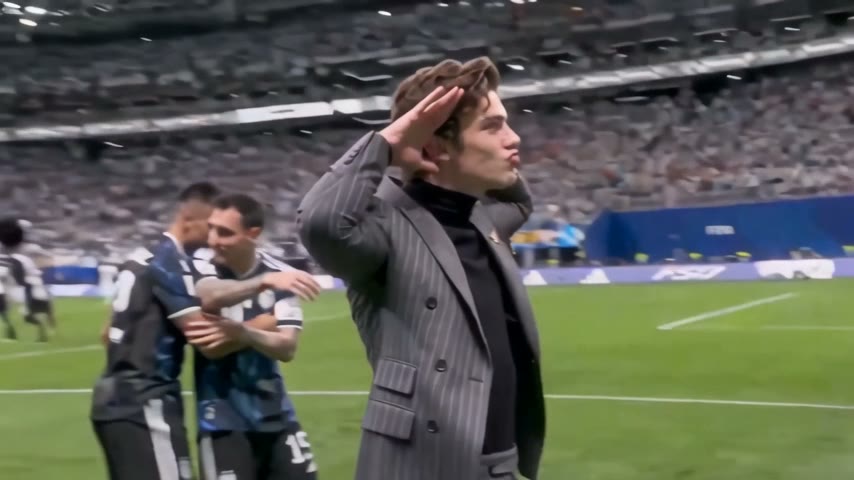
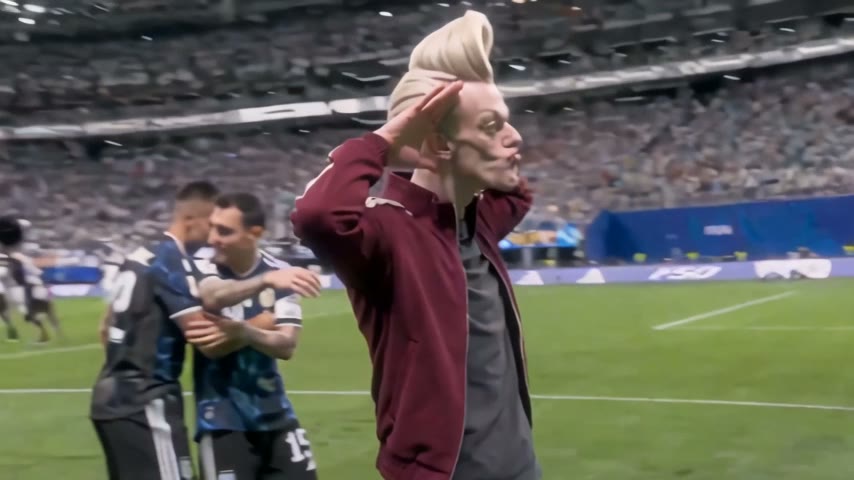
We used a 9-second touchline clip: a man in a grey pinstripe suit salutes the stands, then cups his hands behind his ears and pouts a kiss while two players hug behind him. Our photo was a full-body shot of a character in a maroon track jacket and baggy jeans.
| Our run | |
|---|---|
| Photo | One person, full body, maroon jacket |
| Model | Wan 3.0 (video-to-video) |
| Settings | 9s · 480P · Match source · audio on |
| Credits | 180 |
| Time to finish | About 3.5 minutes |
| Result | Success, first try |
Method 1: Make it yourself with Wan 3.0
Step 1: Save a celebration clip
Pick a clip with one clear main person who stays in frame. Ours was 9 seconds. Keep it to 15 seconds or less, and avoid clips with captions or big logos over the person.
Step 2: Pick your photo
One person, full body if you can, face and clothes easy to see. The model copies the outfit as well as the face, so the jacket in your photo is the jacket in the video. No football kit needed.
Step 3: Set up Wan 3.0
Open Photo to Video AI, switch to the Video tab, add the clip as the source and your photo under Reference images, and choose Wan 3.0. Settings: 480P, aspect ratio Match source, Audio on. For 9 seconds that came to 180 credits.
Step 4: Write the prompt
There are other players in the shot, so the prompt says exactly which person to replace. This is the one we used:
Replace only the main man in the grey suit with the character from image 1. Preserve the original motion, body pose, salute gesture, head turns and camera movement frame by frame. The new character must keep the same face, hairstyle, outfit and body proportions as image 1 throughout the whole clip. Do not change the other players, the crowd, the pitch or the lighting. Photorealistic, broadcast sports footage look, no distortion.
Press Generate. Ours finished in about three and a half minutes, and the video shows up in My Videos, so you can close the tab.
Method 2: Use the ready-made template
We saved the whole setup as a template: the clip, Wan 3.0, the settings and the prompt. You only add the photo.
- Open the Enzo Fernandez Celebration AI video generator. The template is already loaded.
- Upload one photo: one person, full body, face visible.
- Press Generate. The video lands in My Videos.
- Download the MP4 (no watermark) and post it.
What to check before you post
- Face during the head turn. Check that it still looks like the person when the head turns away from the camera, not only in the first frame.
- The hands by the ears. Fingers should stay distinct when they're cupped behind the ears.
- The right person was swapped. The players behind should look unchanged.
- Consent. Only use photos of yourself or people who said yes, and label it as an AI edit when you share it.
FAQ
What was Enzo Fernandez's celebration about?
After scoring Argentina's 85th-minute equaliser against England in the 2026 World Cup semi-final, he cupped his ears toward the England fans, stuck out his tongue and blew a kiss. It was a taunt, and Argentina went on to win 2-1.
How do I turn my photo into an Enzo Fernandez celebration video?
Upload one photo to the Enzo Fernandez Celebration AI template and press Generate, or run Wan 3.0 video-to-video yourself with a celebration clip, your photo and the prompt above.
Does the template include the cupped-ears gesture?
Yes. The scene starts with a quick salute, then both hands go behind the ears with a kiss face, like Enzo did against England. Only the tongue-out part is missing.
Can I use a photo of a friend?
Yes, if they agree. One person per photo, full body, face visible, no sunglasses.
How much does it cost?
Our 9-second run at 480P with audio cost 180 credits. New accounts get 75 free credits, so you'll need a credit pack for a full run. Failed renders are refunded automatically.
How long does it take?
About three and a half minutes for our run.
Is there a watermark?
No. Downloads are clean MP4s on every plan.