How to Make the Nicole Kidman Dance AI Video (2026): Our Manual Wan 3.0 Test
What’s new on this page
- — Published, based on our own Wan 3.0 test run.
First, the name. The Nicole Kidman dance has nothing to do with Nicole Kidman dancing. It's a TikTok routine to "Nicole Kidman", a song by the Slovak singer ADÉLA, and it's been everywhere since September 2026: dance studios posting slowed-down tutorials, ADÉLA doing it with her own dancers, and a lot of people searching for the actress and landing on a pop song instead.
The moves are short and a bit cheeky: prayer hands, a hip sway, a hand to the hair, a few poses at the camera. Easy to watch, surprisingly hard to do without looking stiff. So we tried the AI route and did the whole thing by hand to see what actually works. Below is everything we did, including what went wrong.
Our manual test, step by step
Step 1: Pick a clip with one dancer and a still camera
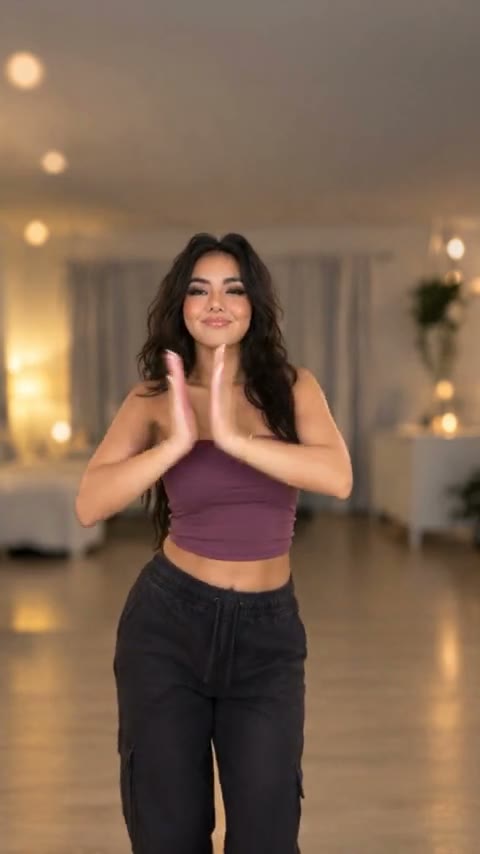
We used a 13-second clip of a woman doing the routine in a warmly lit living room, filmed from the front, no cuts. That's the kind of clip you want. Group versions and anything with jump cuts or the camera swinging around give the model a much harder time. Keep it under 15 seconds, which is the cap for video-to-video.
Step 2: The photo (we used a character sheet, on purpose)
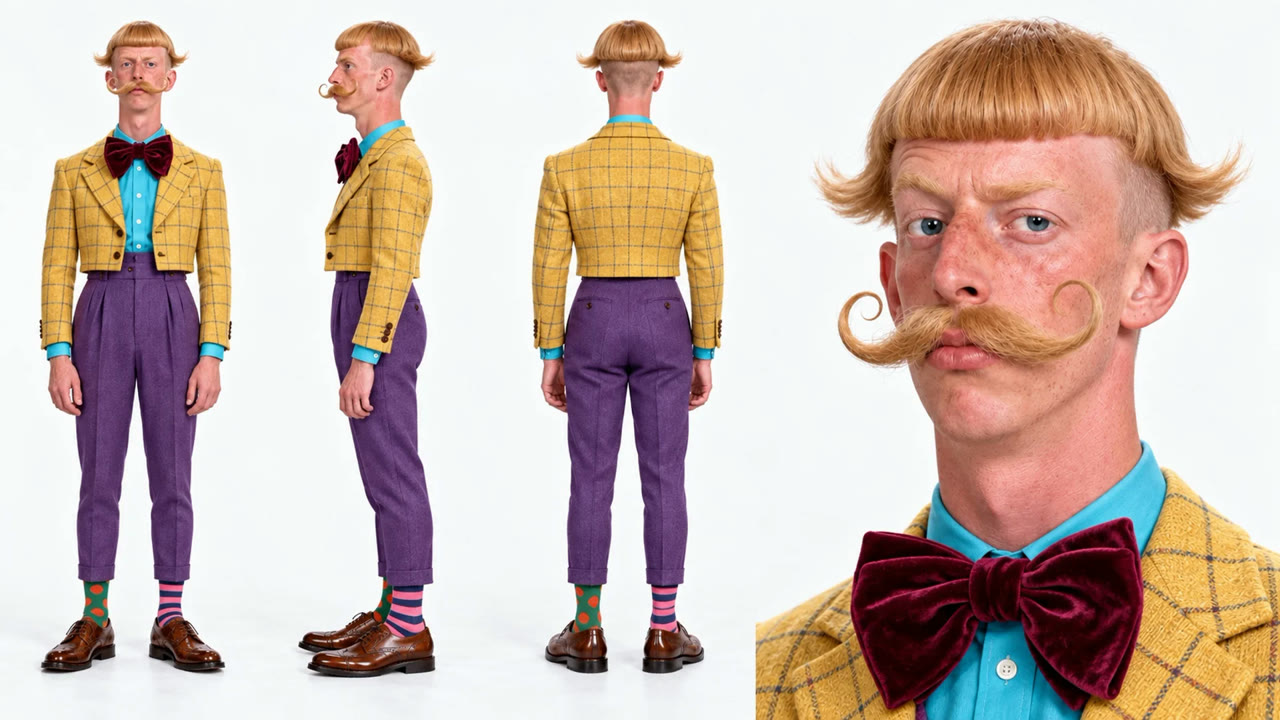
We wanted to stress-test it, so instead of a normal selfie we gave it a character sheet: one made-up guy shown front, side, back and as a face close-up, all on a white background. Bowl cut, curled mustache, yellow plaid cropped jacket, velvet bow tie, purple trousers, and two different socks. If anything was going to confuse the model, it was four copies of the same person in one image.
Step 3: Settings
Open Photo to Video AI, switch to the Video tab, add the dance clip as Source clip and the photo under Reference images, then pick Wan 3.0. Settings: 480P, aspect ratio Match source, Audio on. Length followed the clip, 14 seconds. That came to 280 credits.
Why Wan 3.0? We'd already tested it on Bad Times and Bulin 47, and it kept faces closer to the photo than the others. For dances with two people we've had better luck with MiniMax (Smalltown Boy), and for a quick one-person dance Seedance 2.0 Mini is fine too (Toc Toc). Here we wanted the face and that mustache to survive, so Wan.
Step 4: The prompt
Same prompt as our Bad Times test. The second sentence matters: without it you keep the dancer's living room and only the person changes. With it, the scene comes from your photo, which in our case meant a plain white studio.
Replace the person in the video with the character in image 1, keeping their facial features, hairstyle and outfit unchanged. Replace the video background with the scene in image 1. Strictly keep all of the original person's movements, gestures, head turns, lip movements and facial expressions, as well as the original camera movement, framing and pacing. The result should look real and natural, with lighting that matches the background in the photo, and the person blending into the background seamlessly.
(We typed it in Chinese; English works the same.) Then Generate. It finished in just under 6 minutes.
What came out
- One person, not four. The character sheet didn't confuse it at all. It picked up the front view and used the side and back views to get the jacket and haircut right when he turns.
- The outfit held. Plaid jacket, bow tie, turquoise shirt, purple trousers, even the mismatched socks when the feet are in frame.
- The background swapped. The living room is gone; he's dancing against a light grey studio wall, which is what the white sheet turned into.
- The dance is all there. Prayer hands, hip sway, hand in the hair, the pose at the end, all on the beat, with the song.
- The one miss: the hands. He has long, pale, manicured nails, which came from the original dancer, not our photo. Our photo shows his hands, but at a small size, so the model kept hers. If hands matter to you, use a photo where they're clearly visible.
The contrast is the best part. A stern guy with a handlebar mustache doing a flirty TikTok routine is funnier than any of the straight versions we've seen.
Or skip all of that: the one-photo template
Since the manual run worked first time, we saved it as a template. The clip, Wan 3.0 and the full prompt are already in place.
- Open the Nicole Kidman dance AI video generator.
- Upload one photo: one person, face visible, full body if you can. Its background becomes your dance floor.
- Press Generate. The video shows up in My Videos, so you can close the tab.
- Download the MP4 (no watermark).
Manual vs. template
| Manual (Wan 3.0) | Template | |
|---|---|---|
| What you need | Clip, photo, prompt, settings | One photo |
| Cost in our test | 280 credits (14s, 480P, audio) | Shown on the Generate button |
| Background | From your photo, if you keep the second line | From your photo |
| Pick it when | You want a different dancer's version | You just want the video |
FAQ
What song is the Nicole Kidman dance?
"Nicole Kidman" by ADÉLA, a Slovak singer. The dance went viral on TikTok in September 2026.
Is Nicole Kidman in the video?
No. The song just uses her name. The original dancers are TikTok users, and in the AI version it's whoever is in your photo.
Can I use a character sheet instead of a selfie?
Yes. Ours had four views of the same character, and Wan 3.0 produced one person and used the extra views when he turned around.
Why did my hands or nails look wrong?
If your hands are small or hidden in the photo, the model may keep the original dancer's. A photo with clearly visible hands helps.
How much does it cost?
Our run was 280 credits for 14 seconds at 480P with audio. The cost always shows on the Generate button first, and failed renders are refunded.
How long does it take?
About 6 minutes in our test. You can close the tab and pick it up in My Videos.