How to Make a Smalltown Boy AI Dance Video (2026): 2 Easy Ways
What’s new on this page
- — Published: both methods, based on our own MiniMax H3 test runs.
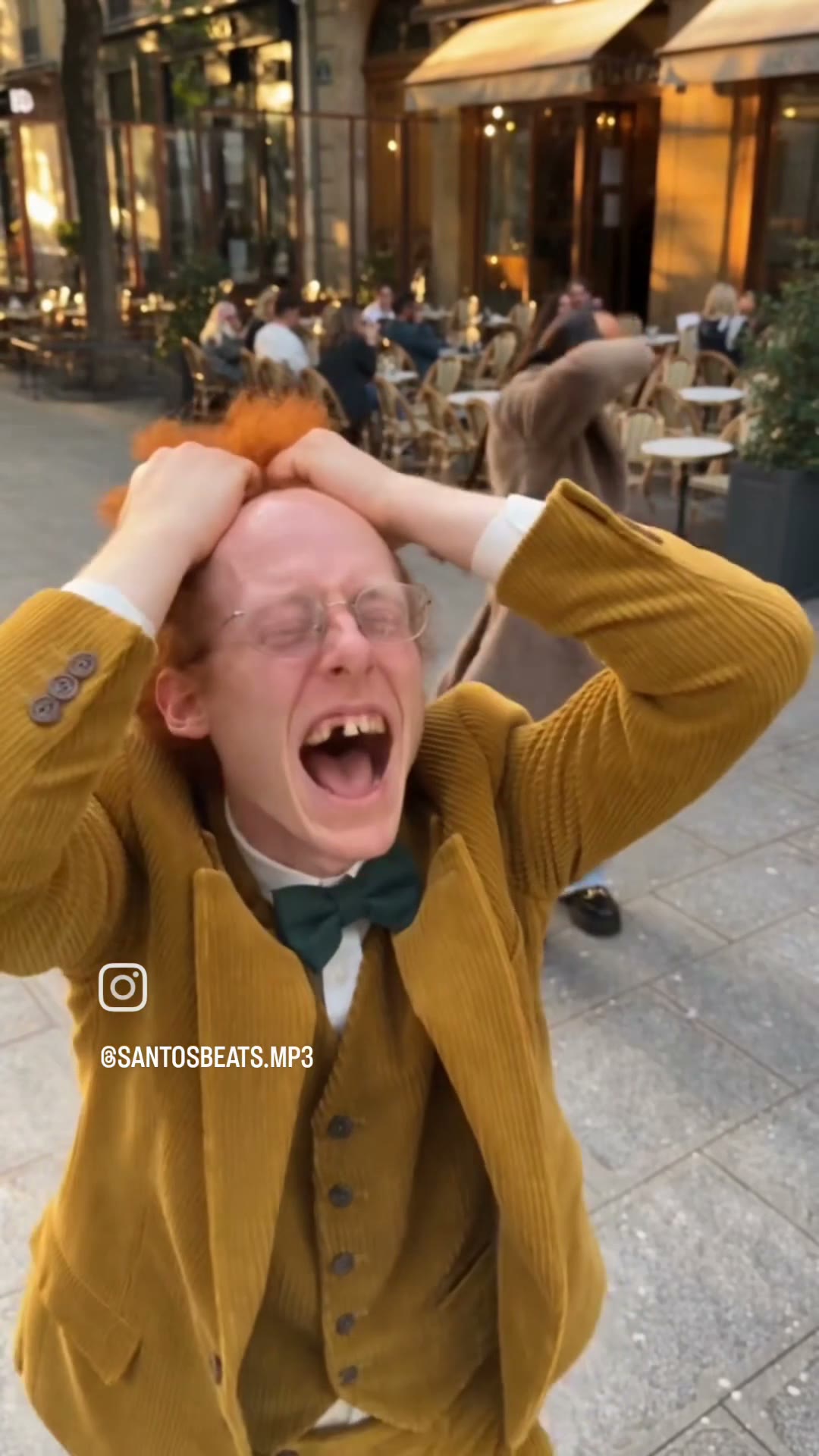
The Smalltown Boy dance trend is everywhere on Instagram and TikTok: two dancers go all-out to Bronski Beat's 1984 synth-pop hit "Smalltown Boy" on the streets of a city — grabbing their heads, screaming in front of a busy café terrace, then dancing side by side with deadpan moves. The Smalltown Boy AI dance video keeps the scene and the choreography and puts you and a friend, a couple, or two characters in place of the dancers.
It looks like any other two-person swap, but it is harder. In this clip the two dancers keep changing places in the frame: first one screams into the lens while the other dances behind him, half hidden; then the video cuts to another street where they dance side by side, the brown-coat dancer now on the left; and the camera jumps between extreme close-ups, a low-angle shot from the ground and wide shots. A short prompt that is fine for other memes is not enough here. This guide shows the workflow we tested, the extra prompt rules it needs, and the two-photo template we built from it.
Method 1: Make it yourself with video-to-video AI
Step 1: Save the dance clip
Save the Smalltown Boy dance clip as an MP4 and trim it to 15 seconds or less — ours was 14 seconds. The popular version is a vertical Instagram Reel, so keep it 9:16. Use it for a personal remix and credit the original creator (@santosbeats.mp3) when you post.
Step 2: Upload two photos
Open the Video tab (video to video), add the clip as the Source clip, then add two Reference images in order: image 1 for the dancer in the yellow corduroy suit, image 2 for the dancer in the brown fluffy coat. One person per photo, facing the camera, full body if you can — the dance shows the whole outfit — sharp and well lit.
Step 3: Pick the model and settings
We used MiniMax H3: 768p, 9:16, length 14 seconds (the clip's own length), Audio on. That costs 280 credits. Seedance and Wan also support video to video; in our Zoolander tests both cost more than MiniMax.
Step 4: Write a prompt built for crossing dancers
This is where the Smalltown Boy video differs from other how-tos. In the Zoolander stare, for example, the two people stay on their own side of the frame, so "replace the person in the black jacket with image 1" is enough. Here the dancers overlap, change positions between cuts and get cropped by close-ups, and that is exactly where AI video models lose track of who is who. Typical failures with a short prompt:
- Face swap mid-clip — after the cut to the side-by-side shot, image 1's face ends up on the brown-coat dancer.
- Blended identities — one dancer gets the other's hair or jacket, or both faces drift toward an average.
- Shrinking or stretching bodies in the extreme close-up and the low-angle shots.
- Leftover details from the original dancers: the gap tooth, the round glasses, the braids, the orange hair.
- The Instagram icon and username burned into the clip coming through in the result.
The fix is to add constraints the simpler prompts don't need: describe each dancer by outfit and look (never "left" or "right"), add an identity rule that forbids mixing or swapping the two people in any frame, ask for stable proportions in close-ups and low angles, list the original details that must not carry over, and ask to remove the overlays. This is the prompt we used:
Use @Video 1 as the complete source video. Replace only the two men in @Video 1. - Replace the man in the yellow corduroy suit with orange-red hair on both sides with the person in @Image 1. Face, head shape, hair, skin tone, body proportions and the whole outfit come only from @Image 1. - Replace the man in the long brown fluffy coat with tinted glasses and braids with the person in @Image 2. Face, head shape, hair, skin tone, body proportions and the whole outfit come only from @Image 2. If part of an outfit is not visible in the reference photo, complete it naturally in the same style. Video lock: Recreate @Video 1 exactly: same street scene, background, passers-by, lighting, camera angles, wide-angle lens perspective, framing, cuts, rhythm, blocking and camera movement. Transfer each original performance to the matching new person: facial expressions, mouth movement, head and hand movement, dance moves, poses, gaze direction and physical interaction. Identity rules: - Keep the two identities completely separate. Never mix, swap or blend faces, hair, outfits or body features between the two people. - In every frame and every angle, keep each person's body proportions and silhouette stable as in their reference photo, including extreme close-ups and low-angle shots. - Do not carry over the original performers' faces, hair, missing tooth, glasses, braids, suit, fluffy coat or any other clothing. Cleanup: Remove all overlays: text, captions, usernames, watermarks, Instagram icons, stickers and UI graphics. Do not add new people, props or objects, and do not change the environment. Hyper-realistic cinematic look, natural skin texture, real human anatomy, accurate hands, stable facial identity, clean frame-to-frame consistency.
(We actually typed it in Chinese and it works the same.) Press Generate. The result shows up in My Videos in a few minutes.
Method 2: Use the ready-made Smalltown Boy template (two photos)
Because this setup worked, we packaged it as a template: MiniMax H3, the full prompt with the crossing rules and the settings (14s · 768p · 9:16 · sound) are fixed. You only add two photos.
- Open the Smalltown Boy AI dance video generator. The template is already loaded.
- Upload Dancer 1 (the yellow suit, in front) and Dancer 2 (the brown coat, behind).
- Press Generate (280 credits). The video lands in My Videos, so you can close the tab.
- Download the vertical MP4 (no watermark) and post it to TikTok, Reels or Shorts.
Which method should you use?
| Method 1: DIY | Method 2: Template | |
|---|---|---|
| What you need | Clip, 2 photos, prompt, settings | 2 photos |
| Finding the clip | Yes, 15s or less | Done for you |
| Handling the crossing dancers | Write the identity rules yourself | Already in the prompt |
| Model | MiniMax H3, Seedance or Wan | MiniMax H3, tested |
| Best for | Other dance clips or custom tweaks | A quick result |
FAQ
Why did the two faces swap halfway through my video?
The dancers change positions between shots — front and back first, then side by side — so if your prompt says "left" and "right" or "front" and "behind", the AI reassigns them after the cut. Describe each dancer by outfit and add a rule that the two identities must never mix or swap in any frame.
Why is one dancer's body a different size in the close-up?
Extreme close-ups and low angles distort proportions. Add a line asking to keep each person's body proportions and silhouette stable in every angle, including close-ups and low-angle shots.
What song is the Smalltown Boy trend?
"Smalltown Boy" by Bronski Beat (1984). Here is the official video on YouTube.
How many credits does it cost?
280 credits for 14 seconds at 768p with sound on MiniMax H3, in both methods. Failed renders refund credits automatically.
Is this affiliated with Bronski Beat?
No. AI Photo Animator is an independent tool. Only upload photos of yourself or of people who gave you permission.